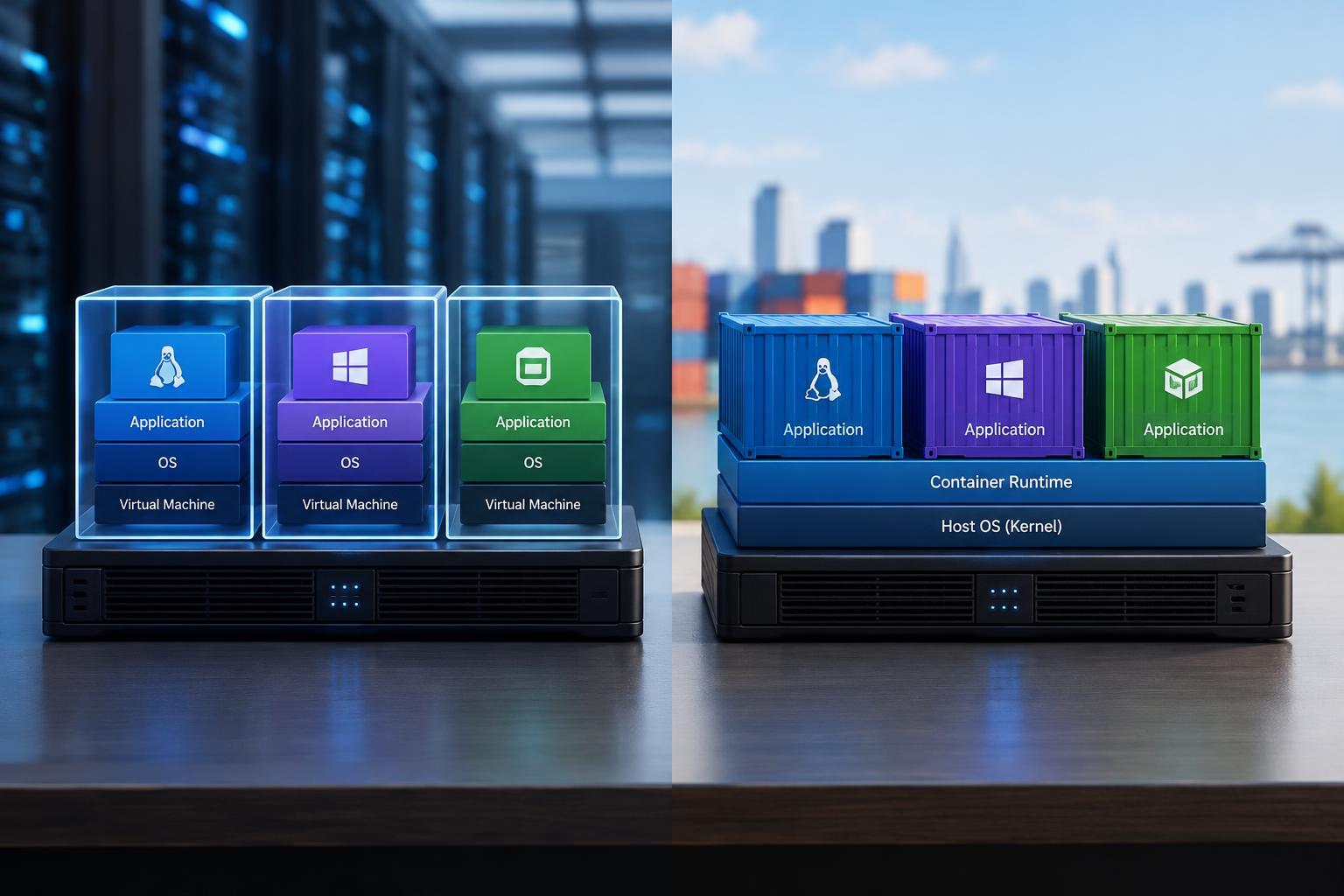
The Key Difference: What Gets Isolated
Virtual machines and containers both let you run software in separate environments on shared hardware. Their main difference is where they draw the boundary. A virtual machine provides virtual hardware on which a guest operating system runs, including its own kernel. A typical container isolates application processes while sharing the kernel of the operating system beneath it.
The kernel manages resources such as memory, processor time and access to devices. Giving each workload its own kernel creates a different isolation boundary from separating processes within one kernel. Neither approach is automatically the right choice: compatibility requirements, workload trust, deployment habits and operational capacity all matter. Containers are not simply smaller virtual machines, and virtual machines are not obsolete containers.
How Virtual Machines Work
A hypervisor creates and manages virtual machines, assigning them virtual processors, memory, disks and network interfaces. Each guest operating system behaves much as it would on a physical computer. Hardware virtualization features help the hypervisor run guest code efficiently while controlling access to the underlying machine. Some hypervisors run directly on hardware; others operate alongside a host operating system.
Because guests have separate kernels, virtual machines can support different operating systems on the same physical host, subject to platform and processor compatibility. This makes them useful for legacy applications, operating-system testing and workloads that need specific kernel features. The trade-off is a larger management footprint: each guest needs updates, configuration and monitoring. Booting a full operating system also generally takes longer and consumes more baseline resources than starting an application container.
How Containers Work
On Linux, containers commonly use namespaces to give processes separate views of resources such as process IDs, networking and mounted filesystems. Control groups account for and constrain resource use, while capabilities and security policies restrict permitted actions. A container image packages the application and its user-space dependencies. The container runtime starts processes from that image with the configured isolation and permissions.
Sharing a kernel avoids booting a separate operating system for every application, so containers often start quickly and allow more workloads to fit on a host. However, resource limits must be configured appropriately; isolation alone does not guarantee fair resource allocation. Portability also has boundaries. An image still needs a compatible kernel environment and processor architecture. Desktop tools commonly run Linux containers inside a Linux virtual machine on non-Linux systems.
Security Depends on the Boundary and the Configuration
A virtual machine generally provides a stronger separation boundary than a conventional shared-kernel container because its guest kernel is distinct from the host and other guests. That can be valuable when workloads belong to different customers or execute code you do not trust. Virtual machines are not invulnerable, though: hypervisor vulnerabilities, exposed management interfaces and unsafe configuration can still undermine isolation.
With containers, a vulnerability in the shared kernel can put multiple workloads at risk. Privileged containers, broad host-directory mounts and access to the container runtime’s control socket can substantially weaken the boundary. Sensible defaults include running applications without root privileges, granting only necessary permissions and keeping images, runtimes and hosts patched. Sandboxed runtimes and microVM-based platforms offer other isolation options, so assess the actual implementation rather than relying only on the label.
Choose Based on Workload and Workflow
Choose virtual machines when software needs a different operating system, a customized kernel or an environment that closely resembles a traditional server. They are also useful for keeping older applications intact when repackaging them would be risky or expensive. For a small number of stable workloads, familiar VM tooling may be simpler than introducing a container platform.
Choose containers when repeatable packaging and frequent application deployments are priorities. They work well for web services, background workers, build jobs and development environments with compatible operating-system requirements. Containers can run stateful applications too, but persistent data needs explicit storage, backup and recovery planning. A container orchestrator can manage scheduling and service recovery, yet adds operational complexity. A few containers on one managed host may be enough for a modest application.
Use Both When Their Strengths Complement Each Other
Containers and virtual machines often work together. A team can run containerized applications inside virtual machines, using the VM layer for infrastructure separation and the container layer for application packaging. Separate VM groups can divide environments or trust levels, while containers make releases consistent within those boundaries. The layers solve different problems, although both still require maintenance.
Before choosing, ask what must be isolated, which operating systems are required, how trusted the code is and who will maintain the environment. Then test representative workloads rather than assuming either option will be faster. Measure startup time, memory use, application performance and recovery behavior. The best design is usually the simplest one that meets your compatibility, security and deployment needs—not the one with the most layers.