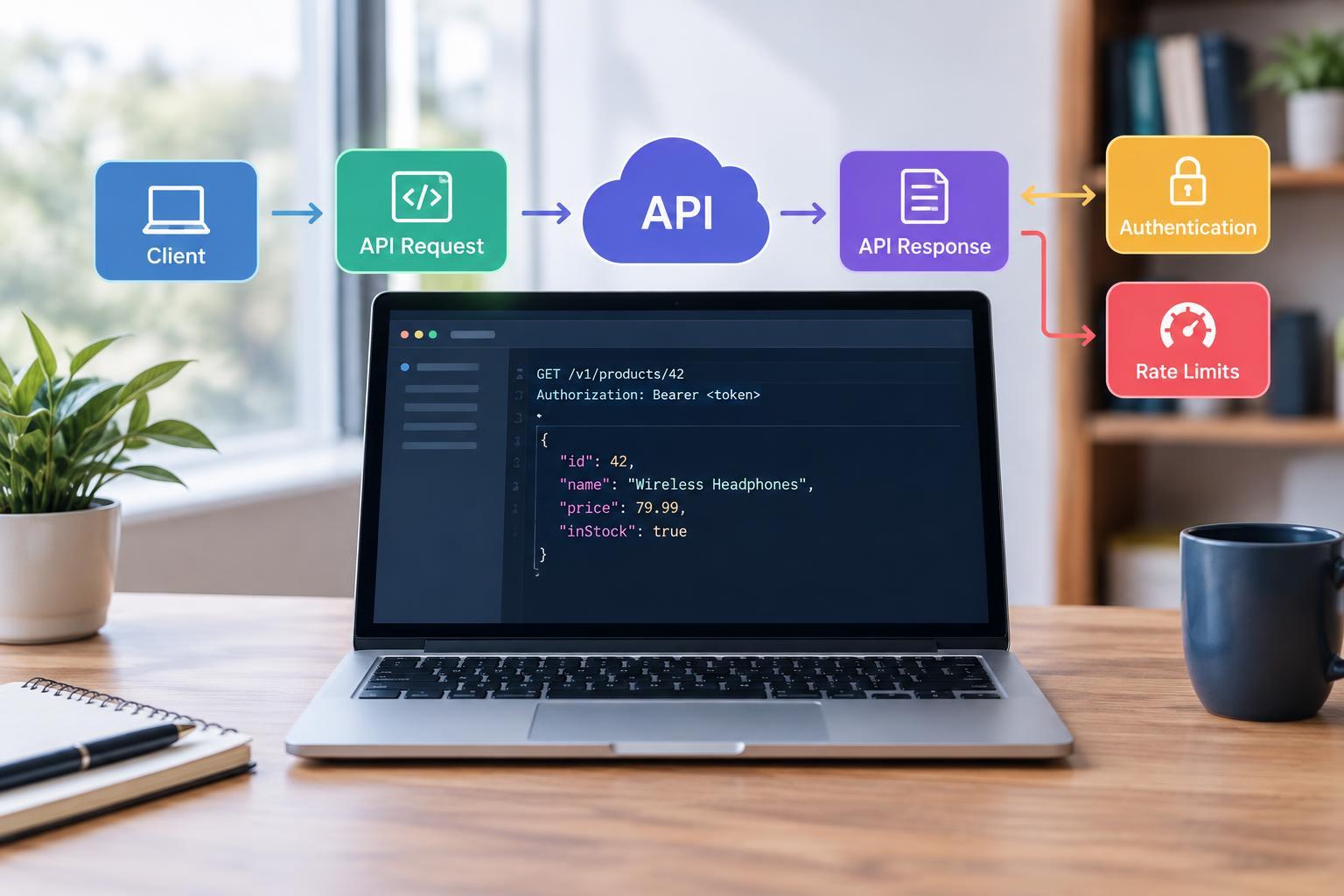
1. What an API Does
An application programming interface, or API, defines how one piece of software can interact with another. Instead of clicking through a website, a program sends a structured instruction and receives a structured result. A shopping app might use an API to retrieve product details, while a scheduling tool might use one to create calendar events.
APIs come in several forms. This guide focuses on web APIs that communicate over HTTP, the protocol also used by browsers. In this arrangement, a client sends requests and a server processes them. The API documentation describes the available operations, the information each operation requires, and the responses a client should expect.
Think of that documentation as an interface contract rather than a promise that every request will succeed. Permissions, invalid input, network problems, and service capacity can all affect the outcome. Reliable integrations account for these possibilities from the start.
2. The Parts of an API Request
A typical HTTP request contains a method, an address, headers, and sometimes a body. The address identifies an endpoint: a location where the API exposes a resource or operation. For example, a path such as /products/42 might identify one product. Query parameters can refine the request, such as limiting results or selecting a page.
The method expresses the intended action. GET normally retrieves information. POST often creates a resource or starts an operation. PUT generally replaces a resource’s representation, PATCH applies changes, and DELETE requests removal. These are common conventions, but the documentation determines what a particular endpoint actually supports.
Headers carry information about the request, such as authentication credentials or the format of its body. A body supplies the data needed for an operation, often using JSON, a text format built from named fields, values, lists, and objects. When creating a task, for example, the body might contain its title and due date. Required fields and valid formats should be checked before sending.
3. Reading an API Response
A response typically includes a status code, headers, and an optional body. The status code summarizes the HTTP outcome. Codes in the 200 range indicate success; 400-range codes generally indicate a problem with the request or its authorization; and 500-range codes indicate a server-side failure. A 404 usually means the requested resource could not be found.
The body contains returned data or details about an error. A successful product lookup might return a name, price, and availability. An unsuccessful request might identify a missing field. Do not assume every response contains JSON: some responses have no body, and infrastructure errors may return another format. Check the status and content type before parsing.
Successful HTTP delivery does not always mean the underlying work is finished. A 202 response, for instance, can mean an operation was accepted for processing. Likewise, a list response may contain only one page of results. Follow the API’s documented rules for checking progress and retrieving additional pages.
4. Authentication and Permissions
Authentication establishes which application or user is making a request. Authorization determines what that identity may do. An API key is a common credential for identifying an application or project. Other services use access tokens, sometimes obtained through OAuth flows that let users grant limited access without sharing their passwords with the requesting application.
Credentials often travel in request headers. Use HTTPS, follow the service’s authentication instructions, and keep secret keys out of public repositories, screenshots, logs, and browser-delivered code. If an integration needs a secret credential, sensitive operations generally belong on a backend you control. Some services provide publishable identifiers, so distinguish those from genuine secrets.
Request only the permissions your integration needs. Tokens may expire or be revoked, so plan for renewal or reauthorization. A 401 commonly indicates missing or invalid authentication, while a 403 commonly indicates that access is forbidden. Check the response details rather than assuming that replacing a key will solve every access failure.
5. Understanding Rate Limits
Rate limits restrict how frequently clients can call an API. A provider might apply limits per application, user, endpoint, or time window. Limits help protect service capacity and distribute access. Some APIs also impose separate usage quotas or concurrency limits, which restrict total consumption or simultaneous requests.
When you exceed a rate limit, the server may return 429 Too Many Requests. It may also provide a Retry-After header or other documented guidance. Wait as instructed rather than immediately repeating the call. Without explicit guidance, bounded exponential backoff increases the delay between attempts; adding randomness helps prevent many clients retrying together.
Reduce unnecessary traffic by caching suitable results, using supported batch operations, and avoiding overly frequent polling. Retry carefully: repeating a request that creates an order or sends a message could duplicate the action. Use documented idempotency mechanisms where available, and do not assume a timeout means the server did nothing.
6. A Practical First Integration
Start with one documented, read-only endpoint. Confirm the base address, API version, required credentials, and expected response. Send a small request using an HTTP client, then inspect its status, headers, and body. Once it works, reproduce the same request in your application.
Before expanding, add timeouts, useful error handling, safe logging, and a retry policy appropriate to the operation. Test invalid input, expired credentials, empty results, and rate-limit responses. Treat the API as a dependency that can fail, not a function that always returns the answer you expect.